Step 1: Log In & Add Your Card on File

Before we can unlock your website, tools, and training portal, you must first activate your account by adding a card on file inside your Alliance Contracting dashboard.

How to Update Your Wallet & Add Your Card
▶
Quick video walkthrough — takes less than 1 minute.

Follow these simple steps:

1. Go to My Wallet

2. Add or update your credit card

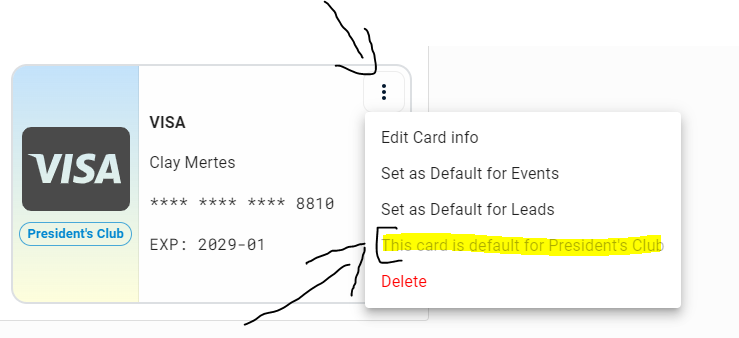
3. Click the three dots and set it as Primary for Presidents Club
!
Important: After adding your card, make sure to set the correct one as your Primary payment method for Presidents Club. See example screenshot
✕
How to Set Your Primary Card
Click the three dots next to your card, then choose “Set as Primary.”
Instruction screenshot
Step 1 Checkpoint
Did you finish this step?
Did you log in, add your card, and set the correct one as your Primary payment method for Presidents Club?